










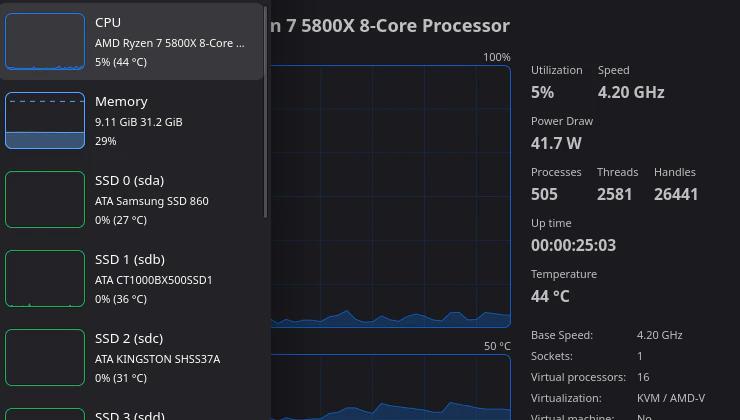

An app I haven’t covered here before is Mission Center – giving you a tidy interface to monitor CPU, Memory, Disk, Network and GPU and more.
It gives you a very easy to use and read UI that allows you to check on system process, thread, and handle count, uptime, clock speed (base and current), cache sizes, RAM and Swap usage, Disk utilisation, network and so much more. Written in Rust using GTK4 and Libadwaita.
It recently had a big version 1.2 update that came with lots of enhancements like a new battery page, improvements to the AppImage and Snap packages along with various other tweaks.
“This release brings a long-requested Battery page, a big overhaul of the graphing backend, per-partition disk usage, and much smarter app detection, alongside a healthy pile of quality-of-life features and bug fixes.”
Noteworthy changes:
- Add a new Battery page to the Performance tab, with charge graphs and detailed battery information (@jlo62)
- Show per-partition usage details on the disk page, including used and free space (@jojo2357)
- Overhaul the graphing backend: smoother animations and rendering, a new loading shimmer while data loads, and less stuttering on application startup (@jojo2357, @kicsyromy)
- Improve application detection, fixing wrong names and icons, phantom entries for PWAs, and constantly cycling processes (@kicsyromy)
- Improvements to the Snap package, which was upgraded to the core24 snap (@kicsyromy)
- Improvements to the AppImage package which now uses quick-sharun, is smaller and no longer depends on FUSE (@kicsyromy)
Minor features:
- Add a second CPU graph that can show temperature, power draw or CPU frequency (@jlo62)
- Add memory compression (zRAM/zswap) statistics to the Memory page (@timatgca)
- Refactor and redesign the Preferences dialog (@kicsyromy)
- Allow disabling entire device categories and individual network types (@kicsyromy)
- Update to GNOME 50 Platform (@kicsyromy)
- Pause UI refreshes by holding the CTRL key, just like the Windows Task Manager (@jlo62)
- More accurate per-process memory usage using a hybrid PSS approximation (@kicsyromy)
- Show per-process swap usage instead of shared memory in the Apps page (@jlo62)
- Allow sending process signals that require elevation via `pkexec` (@jojo2357)
- Add an option to select what the middle GPU graph displays (@jlo62)
- Add a first run dialog and setup script for advanced features (@jlo62)
- Add `–app-id`/`-a` command-line flag for setting custom application IDs (@kicsyromy)
- Collapse and expand rows using double-click or the left and right arrow keys (@jojo2357)
- Display the network connection state in the network details sidebar (@jojo2357)
- Show total GPU memory on the graph when GTT is not available (@jlo62)
- Add an option to gray out zero values in the Apps page (@jlo62)
- Enhance the About System dialog with more information and better copy functionality (@jlo62)
- Add and rebind keyboard shortcuts, including Alt+1/2/3 for switching pages and F9 for toggling the sidebar (@jlo62)
- Add a visual indicator when CPU speed falls back to BogoMIPS (@bleys1)
- Move icon extraction to backend to improve portability and remote monitoring (@jojo2357)
Bug fixes:
- Fix phantom CPU usage spikes when the system is idle (@kicsyromy)
- Fix L3 and L4 cache sizes on CPUs with SNC-like topologies (@kicsyromy)
- Treat ZFS ARC as free memory (@kicsyromy)
- Fix blurry application icons on HiDPI displays (@kicsyromy)
- Fix the SMART dialog so that it properly adapts to narrow widths (@kicsyromy)
- Detect drives becoming ejectable at runtime (@jojo2357)
- Fix a race condition in the Apps page (@jojo2357)
- Fix graphing inconsistency on the disk page (@jojo2357)
- Read CPU temperatures from the hwmon directory used by the SteamDeck (@jlo62)
I really love seeing so many useful apps like this appear over the last few years. It’s not enough to just have games to bring more people to Linux – we need useful apps like this too.
🌐 External Sources: gitlab.com